
MAGFest Adventure
MAGFest Adventure is a yet-to-be audience participation live show for Super MAGFest 2027 (please no jinxes). While I can't show you what the project looks like right now, I will talk a bit about my role on the team and the work I've done so far.
In early April 2026 I got word in the MAGFest staff Slack that there was an opening for a lead engineer for the Adventure project. In short (I'm trying really hard not to spoil anything about the show itself so bear with the vaguenesses):
MAGFest Adventure is an interactive narrative project. Interactions are scripted events where an operator can input audience-driven choices on a secondary display console. The game will be built in the Godot game engine and must be able to show the main presentation and operator console on two separate displays.
Godot being my favorite game engine, and having lots of experience working on cross-functional teams (sorry, been reading a lot of job postings recently), it sounded like a great opportunity. The team consists of our project lead and script writer, a character artist, a few asset artists, and a few devs (the team ebbs and flows so I can't give exact numbers).
I'll skip a bunch of the boring stuff - file organization, git, character animating, etc (okay I don't actually think this stuff is boring but it isn't really the things I want to be talking about). The two things I'm particularly excited about with this project are the operator panel and the cutscene engine.
The Operator Panel
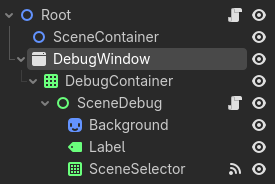
So on the root scene I have a Window element for the debug window. And Godot, lovely as it is, has an easy little project display setting that lets you disable embedded subwindows (essentially, the window will be a separate pop-up window instead of embedded in the game). Technical requirement nearly complete right off the bat. I placed a grid container inside this window so that I can load in and out a bunch of different debug scenes as I need them. At time of writing, we've got the SceneDebug to let us jump between scenes for testing/emergencies, PuppeteerDebug for the Puppeteer scene that lets us control what entity is on screen and what animation it's playing, and ChoiceDebug which is a generic scene where we can add buttons paired with a Callable for audience participation moments. These debug scenese get loaded/unloaded whenever there's a scene change that gets called in the Root, except for the scene selector.
The Cutscene Engine
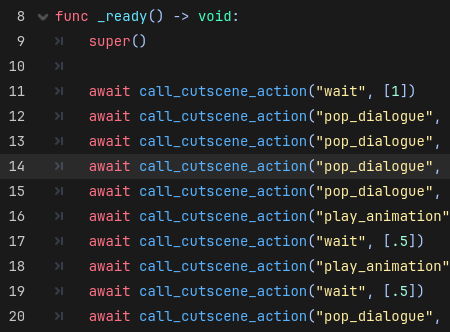
Since I knew the majority of the coding was going to be scripting these cutscenes, and I knew I probably wasn't going to be the only one writing them, I needed a strong backbone to be able to write scenes easily but with a large functionality. I was mostly inspired by this Manuel Sanchez article about the CutsceneDirector pattern. This pattern is pretty close to the end result I implemented for Adventure, but as you might expect I had a few tweaks I needed to work with our custom animations and dialogue scene. I also added a generic tween action that lets you tween any property of any node, since that seemed to be something I wanted to do quite often. The part that I'm most proud of, however, is call_simultaneous and call_sequence:
func call_simultaneous(...cutscene_actions) -> void:
    var multi_action = MultiAction.new()
    for i in range(cutscene_actions.size()):
        multi_action.add_method(func(): await callv(cutscene_actions[i][0], cutscene_actions[i][1]))
    add_child(multi_action)
    multi_action.execute()
    await multi_action.done

func call_sequence(...cutscene_actions) -> void:
    for i in range(cutscene_actions.size()):
        await callv(cutscene_actions[i][0], cutscene_actions[i][1])
The particular issue I ran into was the need to be able to play two or more animation sequences at the same time, such as attack animations, a hit animations, and dialogue. These functions can be nested together to play all the listed actions, but prevent further actions until the root has finished. The MultiAction class is a custom class that keeps track of which actions have finished, and checks on each process loop if all of them have finished to trigger a done signal. This was made specifically to mimic the the behavior of Promise.all() from javascript.